
Waveform Widget#
The Waveform Widget is used to display 1D detector signals. The widget is directly integrated with the BEC framework and can display real-time data from detectors loaded in the current BEC session as well as custom data from users.
Key Features:
Flexible Integration: The widget can be integrated into
BECDockArea, or used as an individual component in your application throughBEC Designer.Data Visualization: Real-time plotting of positioner versus detector values from the BEC session, as well as static plotting of custom data.
Real-time Data Processing: Add real-time Data Processing Pipeline (DAP) to the real-time acquisition.
Data Export: Export data to CSV, H5, and other formats.
Customizable Visual Elements: Customize visual elements such as line color and style.
Interactive Controls: Interactive controls for zooming and panning through the data.
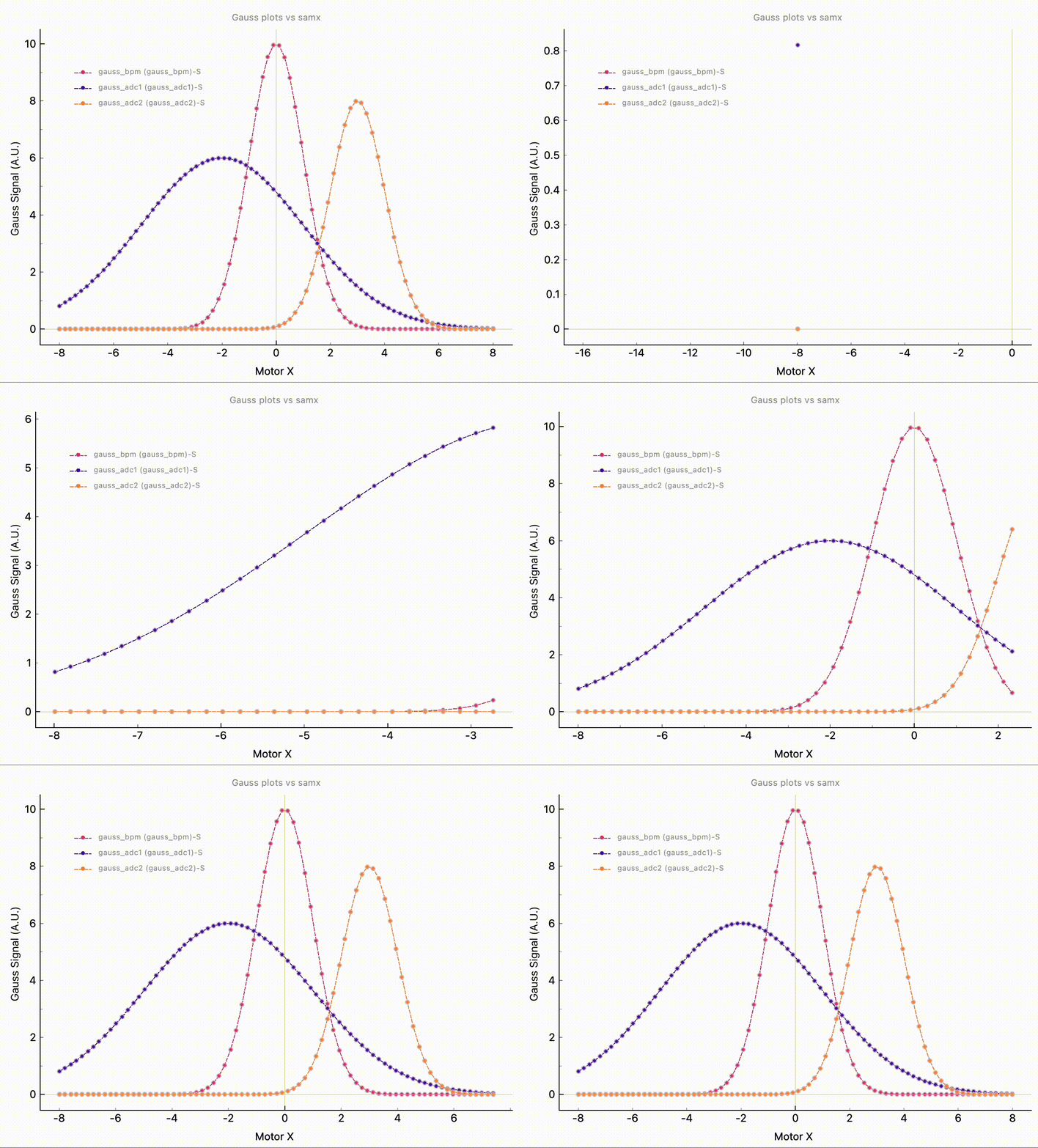
WaveformWidget can be embedded in BECDockArea, or used as an individual component in your application through BEC Designer. However, the command-line API is the same for all cases.
Example 1 - Adding Waveform Widget as a dock with BECDockArea
Adding Waveform into a BECDockArea is similar to adding any other widget.
# Add new WaveformWidgets to the BECDockArea
dock_area = gui.new('my_new_dock_area') # Create a new dock area
plt1 = dock_area.new().new('Waveform')
plt2 = gui.my_new_dock_area.new().new(gui.available_widgets.Waveform) # as an alternative example via dynamic name space

# Add signals to the WaveformWidget
plt1.plot(device_x='samx', device_y='bpm4i')
plt2.plot(device_x='samx', device_y='bpm3i')

# set axis labels
plt1.title = "Gauss plots vs. samx"
plt1.x_label = "Motor X"
plt1.y_label = "Gauss Signal (A.U.)"
Note
The return value of the simulated devices bpm4i and bpm3i may not be Gaussian signals, but they can be easily configured with the code snippet below. For more details, please check the documentation for the simulation.
# bpm4i uses GaussianModel and samx as a reference; default settings
dev.bpm4i.sim.select_sim_model("GaussianModel")

# bpm3i uses StepModel and samx as a reference; default settings
dev.bpm3i.sim.select_sim_model("StepModel")
Example 2- Adding Data Processing Pipeline Curve with LMFit Models
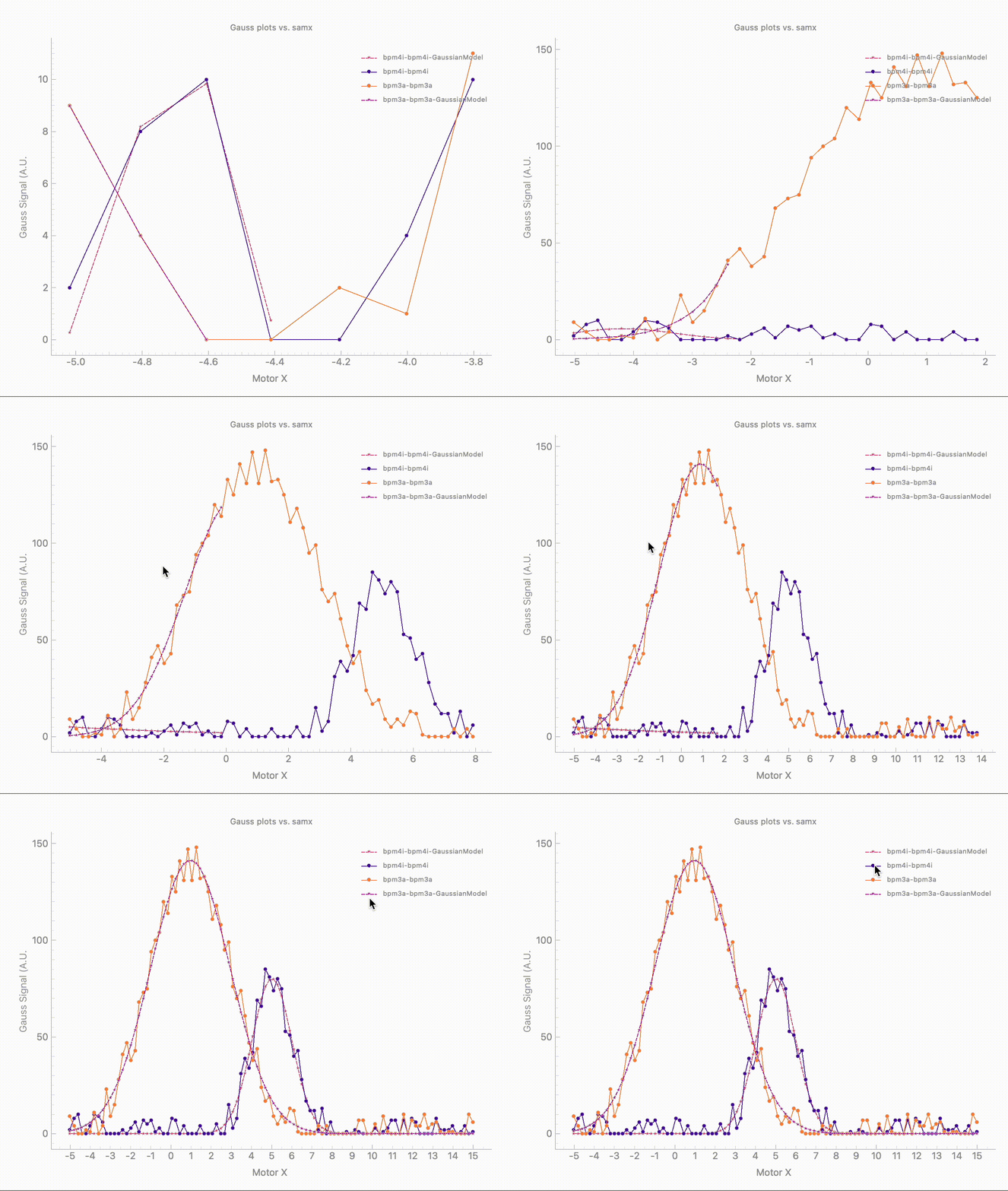
In addition to the scan curve, you can also add a second curve that fits the signal using a specified model from LMFit. The following code snippet demonstrates how to create a 1D waveform curve with an attached DAP process, or how to add a DAP process to an existing curve using the BEC CLI. Please note that for this example, both devices were set as Gaussian signals. You can also add a region of interest (roi) to the plot which will respected by all running DAP processes.
# Add a new dock_area, dock and Waveform and plot bpm4i vs samx with a GaussianModel DAP
plt = gui.new().new().new('Waveform')
plt.plot(device_x='samx', device_y='bpm4i', dap="GaussianModel")

# Add a second curve to the same plot without DAP
plt.plot(device_x='samx', device_y='bpm3a')

# Add DAP to the second curve
plt.add_dap_curve(device_label='bpm3a-bpm3a', dap_name='GaussianModel')

# Add ROI to the plot, this limits the DAP fit to the selected region x_min=-1, x_max=1
# The fit will automatically update
plt.select_roi(region=(-1, 1))
To get the parameters of the fit, you need to retrieve the curve objects and call the dap_params property.
# Get the curve object by name from the legend
dap_bpm4i = plt.get_curve("bpm4i-bpm4i-GaussianModel")
dap_bpm3a = plt.get_curve("bpm3a-bpm3a-GaussianModel")

# Get the parameters of the fit
print(dap_bpm4i.dap_params)
# Output
{'amplitude': 197.399639720862,
 'center': 5.013486095404885,
 'sigma': 0.9820868875739888}

print(dap_bpm3a.dap_params)
# Output
{'amplitude': 698.3072786185278,
 'center': 0.9702840866173836,
 'sigma': 1.97139754785518}
- class Waveform(gui_id: str | None = None, config: dict | None = None, object_name: str | None = None, parent=None, **kwargs)[source]#
Bases:
RPCBaseWidget for plotting waveforms.
- add_dap_curve(device_label: str, dap_name: str | list[str], color: str | None = None, dap_oversample: int = 1, dap_parameters: dict | list | lmfit.Parameters | None = None, **kwargs) Curve[source]#
Create a new DAP curve referencing the existing curve device_label, with the data processing model dap_name. DAP curves can be attached to curves that originate from live devices, history, or fully custom data sources.
- Parameters:
device_label (str) – The label of the source curve to add DAP to.
dap_name (str | list[str]) – The name of the DAP model to use, or a list of model names to build a composite model.
color (str) – The color of the curve.
dap_oversample (int) – The oversampling factor for the DAP curve.
dap_parameters (dict | list | lmfit.Parameters | None) – Optional lmfit parameter overrides sent to the DAP server.
**kwargs
- Returns:
The new DAP curve.
- Return type:
- auto_range(value: bool = True)[source]#
On demand apply autorange to the plot item based on the visible curves.
- Parameters:
value (bool) – If True, apply autorange to the visible curves.
- property auto_range_x: bool#
Set auto range for the x-axis.
- property auto_range_y: bool#
Set auto range for the y-axis.
- property color_palette: str#
The color palette of the figure widget.
- property curves: list[Curve]#
Get the curves of the plot widget as a list.
- Returns:
List of curves.
- Return type:
list
- detach()[source]#
Detach the widget from its parent dock widget (if widget is in the dock), making it a floating widget.
- property enable_fps_monitor: bool#
Enable the FPS monitor.
- property enable_side_panel: bool#
Show Side Panel
- property enable_toolbar: bool#
Show Toolbar.
- get_all_data(output: Literal['dict', 'pandas'] = 'dict') dict[source]#
Extract all curve data into a dictionary or a pandas DataFrame.
- Parameters:
output (Literal["dict", "pandas"]) – Format of the output data.
- Returns:
Data of all curves in the specified format.
- Return type:
dict | pd.DataFrame
- get_curve(curve: int | str) Curve | None[source]#
Get a curve from the plot widget.
- Parameters:
curve (int|str) – The curve to get. It Can be the order of the curve or the name of the curve.
Return(Curve|None): The curve object if found, None otherwise.
- get_dap_params() dict[str, dict][source]#
Get the DAP parameters of all DAP curves.
- Returns:
DAP parameters of all DAP curves.
- Return type:
dict[str, dict]
- get_dap_summary() dict[str, dict][source]#
Get the DAP summary of all DAP curves.
- Returns:
DAP summary of all DAP curves.
- Return type:
dict[str, dict]
- property inner_axes: bool#
Show inner axes of the plot widget.
- property legend_label_size: int#
The font size of the legend font.
- property lock_aspect_ratio: bool#
Lock aspect ratio of the plot widget.
- property max_dataset_size_mb: float#
The maximum dataset size (in MB) permitted when fetching async data from history before prompting the user.
- property minimal_crosshair_precision: int#
Minimum decimal places for crosshair when dynamic precision is enabled.
- property outer_axes: bool#
Show the outer axes of the plot widget.
- plot(arg1: list | np.ndarray | str | None = None, y: list | np.ndarray | None = None, x: list | np.ndarray | None = None, device_x: str | None = None, device_y: str | None = None, signal_x: str | None = None, signal_y: str | None = None, color: str | None = None, label: str | None = None, dap: str | list[str] | None = None, dap_parameters: dict | list | lmfit.Parameters | None | object = None, scan_id: str | None = None, scan_number: int | None = None, **kwargs) Curve[source]#
Plot a curve to the plot widget.
- Parameters:
arg1 (list | np.ndarray | str | None) – First argument, which can be x data, y data, or device_y.
y (list | np.ndarray) – Custom y data to plot.
x (list | np.ndarray) – Custom y data to plot.
device_x (str) – Name of the x signal. - “auto”: Use the best effort signal. - “timestamp”: Use the timestamp signal. - “index”: Use the index signal. - Custom signal name of a device from BEC.
device_y (str) – The name of the device for the y-axis.
signal_x (str) – The name of the entry for the x-axis.
signal_y (str) – The name of the entry for the y-axis.
color (str) – The color of the curve.
label (str) – The label of the curve.
dap (str | list[str]) – The dap model to use for the curve. When provided, a DAP curve is attached automatically for device, history, or custom data sources. Use the same string as the LMFit model name, or a list of model names to build a composite.
dap_parameters (dict | list | lmfit.Parameters | None) – Optional lmfit parameter overrides sent to the DAP server. For a single model: values can be numeric (interpreted as fixed parameters) or dicts like {“value”: 1.0, “vary”: False}. For composite models (dap is list), use either a list aligned to the model list (each item is a param dict), or a dict of { “ModelName”: { “param”: {…} } } when model names are unique.
scan_id (str) – Optional scan ID. When provided, the curve is treated as a history curve and the y‑data (and optional x‑data) are fetched from that historical scan. Such curves are never cleared by live‑scan resets.
scan_number (int) – Optional scan index. When provided, the curve is treated as a history curve and
- Returns:
The curve object.
- Return type:
- remove_curve(curve: int | str)[source]#
Remove a curve from the plot widget.
- Parameters:
curve (int|str) – The curve to remove. It Can be the order of the curve or the name of the curve.
- screenshot(file_name: str | None = None)[source]#
Take a screenshot of the dock area and save it to a file.
- select_roi(region: tuple[float, float])[source]#
Public method if you want the old select_roi style.
- set(**kwargs)[source]#
Set the properties of the plot widget.
- Parameters:
**kwargs – Keyword arguments for the properties to be set.
- Possible properties:
title: str
x_label: str
y_label: str
x_scale: Literal[“linear”, “log”]
y_scale: Literal[“linear”, “log”]
x_lim: tuple
y_lim: tuple
legend_label_size: int
- property signal_x: str | None#
The x signal name.
- property skip_large_dataset_check: bool#
Whether to skip the large dataset warning when fetching async data.
- property skip_large_dataset_warning: bool#
Whether to skip the large dataset warning when fetching async data.
- property title: str#
Set title of the plot.
- update_with_scan_history(scan_index: int = None, scan_id: str = None)[source]#
Update the scan curves with the data from the scan storage. If both arguments are provided, scan_id takes precedence and scan_index is ignored.
- Parameters:
scan_id (str, optional) – ScanID of the scan to be updated. Defaults to None.
scan_index (int, optional) – Index (scan number) of the scan to be updated. Defaults to None.
- property x_grid: bool#
Show grid on the x-axis.
- property x_label: str#
The set label for the x-axis.
- property x_limits: QPointF#
Get the x limits of the plot.
- property x_log: bool#
Set X-axis to log scale if True, linear if False.
- property x_mode: str#
None
- property y_grid: bool#
Show grid on the y-axis.
- property y_label: str#
The set label for the y-axis.
- property y_limits: QPointF#
Get the y limits of the plot.
- property y_log: bool#
Set Y-axis to log scale if True, linear if False.