
Position Indicator Widget#
The PositionIndicator widget is a simple yet effective tool for visually indicating the position of a motor within its set limits. This widget is particularly useful in applications where it is important to provide a visual clue of the motor’s current position relative to its minimum and maximum values. The PositionIndicator can be easily integrated into your GUI application either through direct code instantiation or by using BEC Designer.
Key Features:
Position Visualization: Displays the current position of a motor on a linear scale, showing its location relative to the defined limits.
Customizable Range: The widget allows you to set the minimum and maximum range, adapting to different motor configurations.
Real-Time Updates: Responds to real-time updates, allowing the position indicator to move dynamically as the motor’s position changes.
Compact Design: The widget is designed to be compact and visually appealing, making it suitable for various GUI applications.
Customizable Appearance: The appearance of the position indicator can be customized to match the overall design of your application, including colors, orientation, and size.
BEC Designer Integration: Can be added directly in code or through
BEC Designer, making it adaptable to various use cases.
BEC Designer Customization
Within the BEC Designer’s property editor, the PositionIndicator widget can be customized to suit your application’s requirements. The widget provides the following customization options:
minimum: The minimum value of the position indicator.
maximum: The maximum value of the position indicator.
value: The current value of the position indicator.
vertical: A boolean value indicating whether the position indicator is oriented vertically or horizontally.
indicator_width: The width of the position indicator.
rounded_corners: The radius of the rounded corners of the position indicator.
indicator_color: The color of the position indicator.
background_color: The color of the background of the position indicator.
use_color_palette: A boolean value indicating whether to use the color palette for the position indicator or the custom colors.
BEC Designer properties:
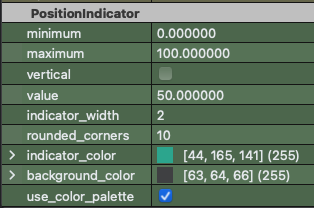
The PositionIndicator widget can be embedded in a BECDockArea or used as an individual component in your application through BEC Designer. Below are examples demonstrating how to create and use the PositionIndicator from the CLI and also directly within Code.
Example 1 - Creating a Position Indicator in Code
In this example, we demonstrate how to create a PositionIndicator widget in code and connect it to a slider to simulate position updates.
from qtpy.QtCore import Qt
from qtpy.QtWidgets import QApplication, QSlider, QVBoxLayout, QWidget
from bec_widgets.widgets.control.device_control.position_indicator.position_indicator import PositionIndicator

app = QApplication([])

# Create the PositionIndicator widget
position_indicator = PositionIndicator()

# Create a slider to simulate position changes
slider = QSlider(Qt.Horizontal)
slider.valueChanged.connect(lambda value: position_indicator.set_value(value))

# Create a layout and add the widgets
layout = QVBoxLayout()
layout.addWidget(position_indicator)
layout.addWidget(slider)

# Set up the main widget
widget = QWidget()
widget.setLayout(layout)
widget.show()

app.exec_()
Example 2 - CLI Example, illustrating how to use the position_indicator API
You can set the minimum and maximum range for the position indicator to reflect the actual limits of the motor.
# Create a new PositionIndicator widget
dock_area = gui.new()
position_indicator = dock_area.new("position_indicator").new(gui.available_widgets.PositionIndicator)

# Set the range for the position indicator
position_indicator.set_range(min_value=0, max_value=200)
Example 3 - Integrating the Position Indicator in BEC Designer
The PositionIndicator can be added to your GUI layout using BEC Designer. Once added, you can connect it to the motor’s position updates using the on_position_update slot.
# Example: Updating the position in a BEC Designer-based application
self.position_indicator.set_value(new_position_value)
- class PositionIndicator(gui_id: str | None = None, config: dict | None = None, object_name: str | None = None, parent=None, **kwargs)[source]#
Bases:
RPCBaseDisplay a position within a defined range, e.g. motor limits.
- property indicator_width#
Property to get the width of the indicator
- property rounded_corners#
Property to get the rounded corners of the position indicator
- set_range(min_value: float, max_value: float)[source]#
Set the range of the position indicator
- Parameters:
min_value (float) – Minimum value of the range
max_value (float) – Maximum value of the range
- set_value(position: float)[source]#
Set the position of the indicator
- Parameters:
position – The new position of the indicator
- property vertical#
Property to determine the orientation of the position indicator