
BECDockArea#
BECDockArea is a powerful and flexible container designed to host various widgets and docks within a grid layout. It provides an environment for organizing and managing complex user interfaces, making it ideal for applications that require multiple tools and data visualizations to be displayed simultaneously. BECDockArea is particularly useful for embedding not only visualization tools but also other interactive components, allowing users to tailor their workspace to their specific needs.
Flexible Dock Management: Easily add, remove, and rearrange docks within
BECDockArea, providing a customized layout for different tasks.State Persistence: Save and restore the state of the dock area, enabling consistent user experiences across sessions.
Dock Customization: Add docks with customizable positions, names, and behaviors, such as floating or closable docks.
Integration with Widgets: Integrate various widgets like
WaveformWidget,ImageWidget, andMotorMapWidgetintoBECDockArea, either as standalone tools or as part of a more complex interface.
BEC Dock Area Components Schema
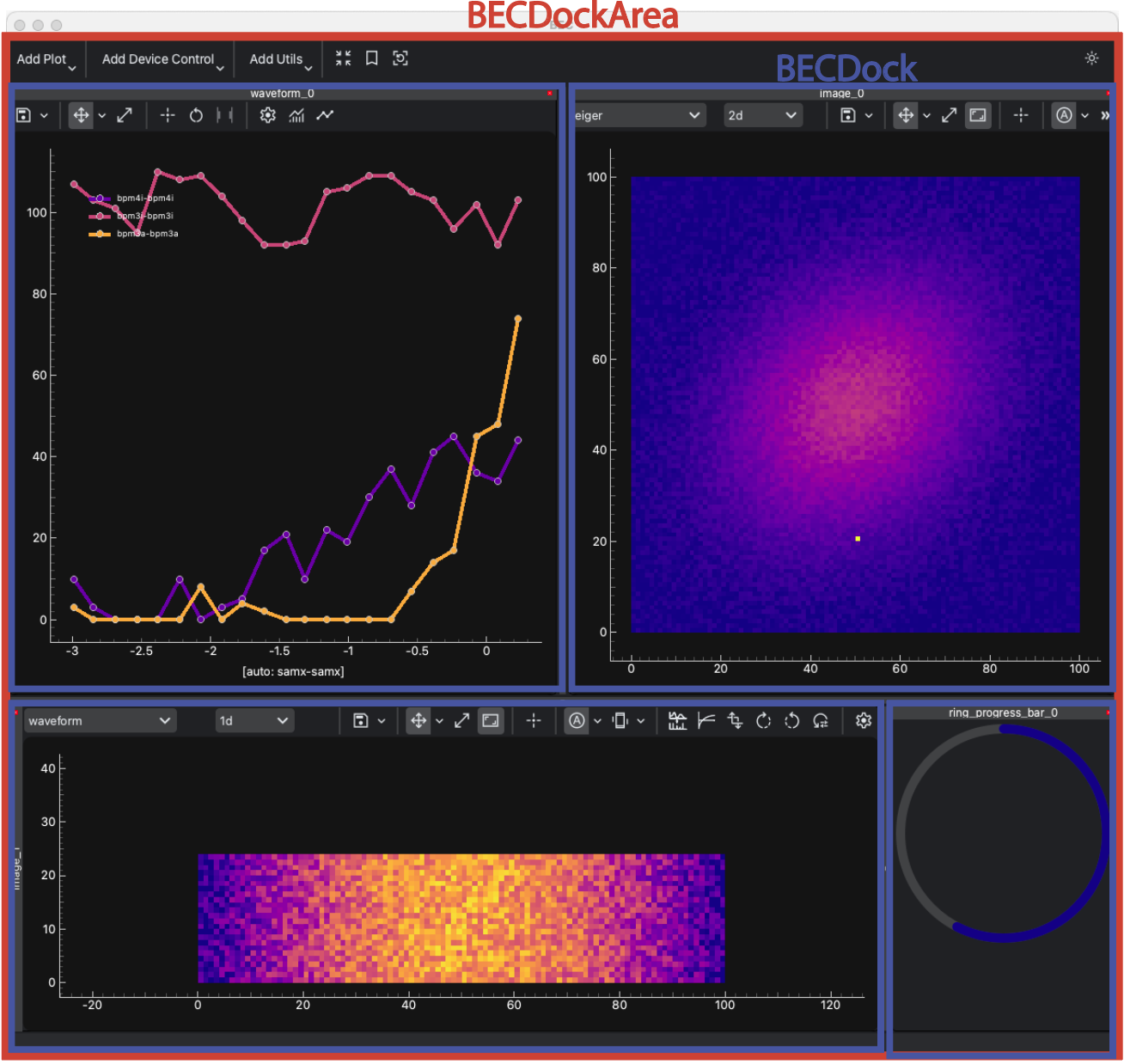
In the following examples, we will use BECIPythonClient as the main object to interact with the BECDockArea. These tutorials focus on how to work with the BECDockArea framework, such as adding and removing docks, saving and restoring layouts, and managing the docked widgets. By default the BECDockArea is referred to as gui in BECIPythonClient. For more detailed examples of each individual component, please refer to the example sections of each individual widget.
Example 1 - Adding Docks to BECDockArea
In this example, we will demonstrate how to add different docks to a single BECDockArea widget. New docks are always added to the bottom of the dock area by default; however, you can specify the position of the dock by using the position and relative_to arguments.
# Create a new dock_area from GUI object
dock_area = gui.new()

# Add a new dock with a Waveform to the BECDockArea
dock_area.new(name="waveform_dock", widget="Waveform")
dock1 = dock_area.waveform_dock # dynamic namespace was created

# Add a second dock with a MotorMapWidget to the BECDockArea to the right of the first dock
dock2 = dock_area.new(name="motor_dock", widget="MotorMap",relative_to="Waveform Dock", position="right")

# Add a third dock with an ImageWidget to the BECDockArea, placing it on bottom of the dock area
dock3 = dock_area.new(name="image_dock", widget="Image")
Hint
You can move docks around by dragging them with the mouse using the dock’s title bar. The dock will snap to the grid layout of the dock area.
Example 2 - Access of Docks in BECDockArea
Docks can be accessed by their name or by the dock object. The dock object can be used to modify the dock properties or to add widgets to the dock.
# All docks can be accessed by their name from the panels dictionary
dock_area.panels

# Output
{'waveform_dock': <BECDock with name: waveform_dock>,
 'motor_dock': <BECDock with name: motor_dock>,
 'image_dock': <BECDock with name: image_dock>}
# Access all docks from the dock area via list
dock_area.panel_list

# Access through dynamic namespace mapping
dock_area.waveform_dock
dock_area.motor_dock
dock_area.image_dock

# If objects were closed, we will keep a reference that will indicate that the dock was deleted
# Try closing the window with the dock_area via mouse click on x

dock_area
# Output
<Deleted widget with gui_id BECDockArea_2025_04_24_14_28_11_742887>
Example 3 - Detaching and Attaching Docks in BECDockArea
Docks in BECDockArea can be detached (floated) or reattached to the main dock area. This is useful when you want to temporarily undock a widget for better visibility or organization.
# Detach the dock named "Waveform Dock"
dock_area.detach_dock("waveform_dock")
# Alternatively, you can use the dock object to detach the dock
dock1 = dock_area.waveform_dock
dock1.detach()

# Docks can be individually reattached to the main dock area
dock2.attach()

# Reattach all floating docks to the main dock area
gui.attach_all()
Note
Floating docks are always returned to the original dock area if they are closed manually. Docks can also be detached by double-clicking on the dock title.
Example 4 - Removing Docks from BECDockArea
Docks can be removed from the dock area by their name or by the dock object. The dock object can be used to remove the dock from the dock area.
# Removing docks by their name
dock_area.delete("waveform_dock")
# Alternatively, you can use the dock object to remove the dock
dock1 = dock_area.motor_dock
dock1.remove()

# Removing all docks from the dock area
gui.delete_all()
Warning
When removing a dock, all widgets within the dock will be removed as well. This action cannot be undone, and all references to the dock and its widgets will be lost.
- class BECDockArea(gui_id: str | None = None, config: dict | None = None, object_name: str | None = None, parent=None, **kwargs)[source]#
Bases:
RPCBase- delete(object_name: str) bool[source]#
Remove a widget from the dock area by its object name.
- Parameters:
object_name – The object name of the widget to remove.
- Returns:
True if the widget was found and removed, False otherwise.
- Return type:
bool
- Raises:
ValueError – If no widget with the given object name is found.
Example
>>> dock_area.delete("my_widget")
True
- delete_profile(name: str | None = None, show_dialog: bool = False) bool[source]#
Delete a workspace profile.
- Parameters:
name – The name of the profile to delete. If None, uses the currently selected profile from the toolbar combo box (for UI usage).
show_dialog – If True, show confirmation dialog before deletion. Defaults to False for CLI/programmatic usage.
- Returns:
True if the profile was deleted, False otherwise.
- Return type:
bool
- Raises:
ValueError – If the profile is read-only or doesn’t exist (when show_dialog=False).
- describe_layout() list[dict[str, Any]][source]#
Return metadata describing splitter paths, orientations, and contained docks.
Useful for determining the keys to use in set_layout_ratios(splitter_overrides=…).
- list_profiles() list[str][source]#
List available workspace profiles in the current namespace.
- Returns:
List of profile names.
- Return type:
list[str]
- load_profile(name: str | None = None)[source]#
Load a workspace profile.
Before switching, persist the current profile to the user copy. Prefer loading the user copy; fall back to the default copy.
- Parameters:
name (str | None) – The name of the profile to load. If None, prompts the user.
- property mode: str#
None
- new(widget: QWidget | str, *, closable: bool = True, floatable: bool = True, movable: bool = True, start_floating: bool = False, where: "Literal['left', 'right', 'top', 'bottom'] | None" = None, tab_with: CDockWidget | QWidget | str | None = None, relative_to: CDockWidget | QWidget | str | None = None, show_title_bar: bool | None = None, title_buttons: Mapping[str, bool] | Sequence[str] | str | None = None, show_settings_action: bool | None = None, promote_central: bool = False, object_name: str | None = None, **widget_kwargs) QWidget | BECWidget[source]#
Create a new widget (or reuse an instance) and add it as a dock.
- Parameters:
widget (QWidget | str) – Instance or registered widget type string.
closable (bool) – Whether the dock is closable.
floatable (bool) – Whether the dock is floatable.
movable (bool) – Whether the dock is movable.
start_floating (bool) – Whether to start the dock floating.
where (Literal["left", "right", "top", "bottom"] | None) – Dock placement hint relative to the dock area (ignored when
relative_tois provided without an explicit value).tab_with (CDockWidget | QWidget | str | None) – Existing dock (or widget/name) to tab the new dock alongside.
relative_to (CDockWidget | QWidget | str | None) – Existing dock (or widget/name) used as the positional anchor. When supplied and
whereisNone, the new dock inherits the anchor’s current dock area.show_title_bar (bool | None) – Explicitly show or hide the dock area’s title bar.
title_buttons (Mapping[str, bool] | Sequence[str] | str | None) – Mapping or iterable describing which title bar buttons should remain visible. Provide a mapping of button names (
"float","close","menu","auto_hide","minimize") to booleans, or a sequence of button names to hide.show_settings_action (bool | None) – Control whether a dock settings/property action should be installed. Defaults to
Falsefor the basic dock area; subclasses such as BECDockArea override the default toTrue.promote_central (bool) – When True, promote the created dock to be the dock manager’s central widget (useful for editor stacks or other root content).
object_name (str | None) – Optional object name to assign to the created widget.
**widget_kwargs – Additional keyword arguments passed to the widget constructor when creating by type name.
- Returns:
The created or reused widget instance.
- Return type:
- save_profile(name: str | None = None, *, show_dialog: bool = False, quick_select: bool | None = None)[source]#
Save the current workspace profile.
- On first save of a given name:
writes a default copy to states/default/<name>.ini with tag=default and created_at
writes a user copy to states/user/<name>.ini with tag=user and created_at
- On subsequent saves of user-owned profiles:
updates both the default and user copies so restore uses the latest snapshot.
Read-only bundled profiles cannot be overwritten.
- Parameters:
name (str | None) – The name of the profile to save. If None and show_dialog is True, prompts the user.
show_dialog (bool) – If True, shows the SaveProfileDialog for user interaction. If False (default), saves directly without user interaction (useful for CLI usage).
quick_select (bool | None) – Whether to include the profile in quick selection. If None (default), uses the existing value or True for new profiles. Only used when show_dialog is False; otherwise the dialog provides the value.
- set_layout_ratios(*, horizontal: Sequence[float] | Mapping[int | str, float] | None = None, vertical: Sequence[float] | Mapping[int | str, float] | None = None, splitter_overrides: Mapping[int | str | Sequence[int], Sequence[float] | Mapping[int | str, float]] | None = None) None[source]#
Adjust splitter ratios in the dock layout.
- Parameters:
horizontal – Weights applied to every horizontal splitter encountered.
vertical – Weights applied to every vertical splitter encountered.
splitter_overrides – Optional overrides targeting specific splitters identified by their index path (e.g.
{0: [1, 2], (1, 0): [3, 5]}). Paths are zero-based indices following the splitter hierarchy, starting from the root splitter.
Example
To build three columns with custom per-column ratios:
area.set_layout_ratios(
    horizontal=[1, 2, 1],             # column widths
    splitter_overrides={
        0: [1, 2],                    # column 0 (two rows)
        1: [3, 2, 1],                 # column 1 (three rows)
        2: [1],                       # column 2 (single row)
    },
)
- widget_list(bec_widgets_only: bool = True) list[QWidget][source]#
Return a list of widgets contained in the dock area.
- Parameters:
bec_widgets_only (bool) – If True, only include widgets that are BECConnector instances.
- widget_map(bec_widgets_only: bool = True) dict[str, QWidget][source]#
Return a dictionary mapping widget names to their corresponding widgets.
- Parameters:
bec_widgets_only (bool) – If True, only include widgets that are BECConnector instances.
- property workspace_is_locked: bool#
Get or set the lock state of the workspace.
- Returns:
True if the workspace is locked, False otherwise.
- Return type:
bool