
Device Browser#
The DeviceBrowser widget provides a user-friendly interface for browsing through all available devices in the current BEC session. As it supports drag functionality, users can easily drag and drop device into other widgets or applications.
Note
The Device Browser widget is currently under development. Other widgets may not support drag and drop functionality yet.
Key Features:
Device Search: Allows users to search for devices using regular expressions.
Drag and Drop: Supports drag and drop functionality for easy transfer of devices to other widgets or applications.
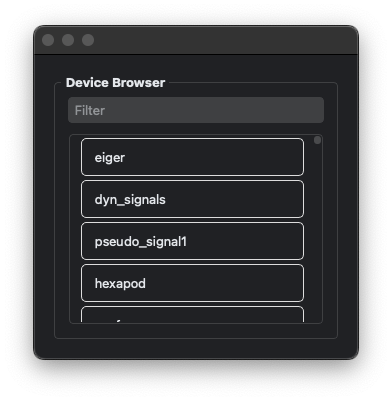
In this example, we demonstrate how to add a DeviceBrowser widget to a BECDockArea to visualize the progress of a task.
# Add a new dock with a DeviceBrowser widget
dock_area = gui.new()
browser = dock_area.new("device_browser").new(gui.available_widgets.DeviceBrowser)
# You can also access the DeviceBrowser widget directly from the dock_area
dock_area.device_browser.DeviceBrowser
- class DeviceBrowser(gui_id: str | None = None, config: dict | None = None, object_name: str | None = None, parent=None, **kwargs)[source]#
Bases:
RPCBaseDeviceBrowser is a widget that displays all available devices in the current BEC session.