
Scatter Waveform Widget#
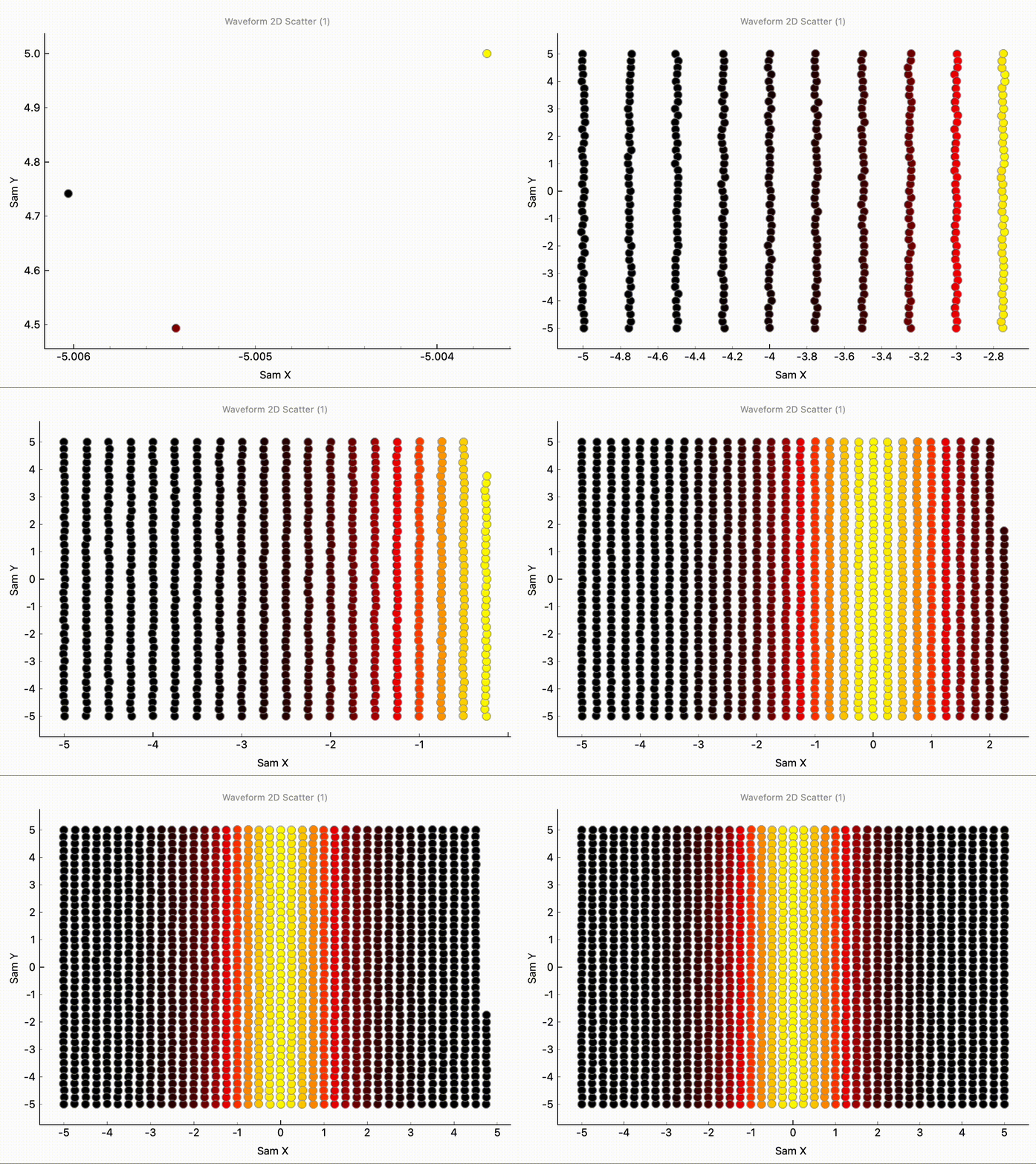
The 2D scatter plot widget is designed for more complex data visualization. It employs a false color map to represent a third dimension (z-axis), making it an ideal tool for visualizing multidimensional data sets.
Key Features:
Real-Time Data Visualization: Display 2D scatter plots with a third dimension represented by color.
Flexible Integration: Can be integrated into
BECDockArea, or used as an individual component in your application throughBEC Designer.
ScatterWaveform widget can be embedded in BECDockArea, or used as an individual component in your application through BEC Designer. The command-line API is consistent across these contexts.
Example
# Add a new dock_area, a new dock and a BECWaveForm to the dock
plt = gui.new().new().new(gui.available_widgets.ScatterWaveform)
plt.plot(device_x='samx', device_y='samy', device_z='bpm4i')
Note
The ScatterWaveform widget only plots the data points if both x and y axis motors are moving. Or more generally, if all signals are of readout type monitored.
- class ScatterWaveform(gui_id: str | None = None, config: dict | None = None, object_name: str | None = None, parent=None, **kwargs)[source]#
Bases:
RPCBase- auto_range(value: bool = True)[source]#
On demand apply autorange to the plot item based on the visible curves.
- Parameters:
value (bool) – If True, apply autorange to the visible curves.
- property auto_range_x: bool#
Set auto range for the x-axis.
- property auto_range_y: bool#
Set auto range for the y-axis.
- property color_map: str#
The color map of the scatter waveform.
- detach()[source]#
Detach the widget from its parent dock widget (if widget is in the dock), making it a floating widget.
- property device_x: str#
Device name for the X axis.
- property device_y: str#
Device name for the Y axis.
- property device_z: str#
Device name for the Z (color) axis.
- property enable_fps_monitor: bool#
Enable the FPS monitor.
- property enable_side_panel: bool#
Show Side Panel
- property enable_toolbar: bool#
Show Toolbar.
- property inner_axes: bool#
Show inner axes of the plot widget.
- property legend_label_size: int#
The font size of the legend font.
- property lock_aspect_ratio: bool#
Lock aspect ratio of the plot widget.
- property minimal_crosshair_precision: int#
Minimum decimal places for crosshair when dynamic precision is enabled.
- property outer_axes: bool#
Show the outer axes of the plot widget.
- plot(device_x: str, device_y: str, device_z: str, signal_x: None | str = None, signal_y: None | str = None, signal_z: None | str = None, color_map: str | None = 'plasma', label: str | None = None, validate_bec: bool = True) ScatterCurve[source]#
Plot the data from the device signals.
- Parameters:
device_x (str) – The name of the x device signal.
device_y (str) – The name of the y device signal.
device_z (str) – The name of the z device signal.
signal_x (None | str) – The x entry of the device signal.
signal_y (None | str) – The y entry of the device signal.
signal_z (None | str) – The z entry of the device signal.
color_map (str | None) – The color map of the scatter waveform.
label (str | None) – The label of the curve.
validate_bec (bool) – Whether to validate the device signals with current BEC instance.
- Returns:
The scatter curve object.
- Return type:
- screenshot(file_name: str | None = None)[source]#
Take a screenshot of the dock area and save it to a file.
- set(**kwargs)[source]#
Set the properties of the plot widget.
- Parameters:
**kwargs – Keyword arguments for the properties to be set.
- Possible properties:
title: str
x_label: str
y_label: str
x_scale: Literal[“linear”, “log”]
y_scale: Literal[“linear”, “log”]
x_lim: tuple
y_lim: tuple
legend_label_size: int
- property signal_x: str#
Signal entry for the X axis device.
- property signal_y: str#
Signal entry for the Y axis device.
- property signal_z: str#
Signal entry for the Z (color) axis device.
- property title: str#
Set title of the plot.
- update_with_scan_history(scan_index: int = None, scan_id: str = None)[source]#
Update the scan curves with the data from the scan storage. Provide only one of scan_id or scan_index.
- Parameters:
scan_id (str, optional) – ScanID of the scan to be updated. Defaults to None.
scan_index (int, optional) – Index of the scan to be updated. Defaults to None.
- property x_grid: bool#
Show grid on the x-axis.
- property x_label: str#
The set label for the x-axis.
- property x_limits: QPointF#
Get the x limits of the plot.
- property x_log: bool#
Set X-axis to log scale if True, linear if False.
- property y_grid: bool#
Show grid on the y-axis.
- property y_label: str#
The set label for the y-axis.
- property y_limits: QPointF#
Get the y limits of the plot.
- property y_log: bool#
Set Y-axis to log scale if True, linear if False.